Configuring Reverse Charge GST to post to Interim GST Payable in D365 F&O
The Reverse Charge Mechanism (RCM) under GST shifts the responsibility of paying GST from the supplier to the recipient of goods or services. In Dynamics 365 Finance & Operations, the India GST tax engine handles the calculation and accounting of RCM transactions through Electronic Reporting (ER) configurations.
However, the standard India GST tax engine configuration posts the recoverable portion of RCM tax with a credit to GST Payable.
While this is the standard system behavior, some businesses require the RCM liability to be temporarily recognized under Interim GST Payable, rather than directly under GST Payable.
This blog explains how to extend the standard Microsoft India GST tax engine configuration using Electronic Reporting (ER) to achieve the required accounting treatment without modifying the original Microsoft configuration.
Let's first understand the difference between the standard accounting and the required accounting.
Standard accounting – Microsoft configuration
In the standard India GST tax engine configuration, when an RCM vendor invoice is posted, the recoverable portion of GST is accounted for as follows:
Main account | Dr | Cr |
Interim GST Recoverable | XXX |
|
GST Payable |
| XXX |
Expected accounting – Business requirement
The business requirement is to credit Interim GST Payable instead of GST Payable.
Main account | Dr | Cr |
Interim GST Recoverable | XXX |
|
Interim GST Payable |
| XXX |
This allows the business to recognise the RCM liability separately under an interim liability account.
This document shows how to configure the tax engine to achieve this.
In D365 Finance & Operations, India GST calculations and accounting are handled through the Tax Engine, which is delivered through Electronic Reporting (ER) configurations.
The standard configuration hierarchy includes:
- Taxable Document
- Taxable Document (India)
- Tax (India GST)
Microsoft-owned configurations cannot be edited directly. Therefore, to accommodate business-specific requirements, we need to derive the standard Tax (India GST) configuration and make the required changes in the derived configuration.
For this requirement, we will change only the credit posting type of the Interim Recoverable Amount tax measure.
The debit posting to Interim Recoverable will remain unchanged.
The required change applies to the following posting combinations:
Component | Posting (sort order) | Tax measure | Standard Dr / Cr | Extended Dr / Cr |
|---|---|---|---|---|
CGST | 1 – Purchase - Item | Interim Recoverable Amount | Interim Recoverable / Tax Payable | Interim Recoverable / Interim Payable |
CGST | 2 – Purchase - Service | Interim Recoverable Amount | Interim Recoverable / Tax Payable | Interim Recoverable / Interim Payable |
SGST | 1 – Purchase - Item | Interim Recoverable Amount | Interim Recoverable / Tax Payable | Interim Recoverable / Interim Payable |
SGST | 2 – Purchase - Service | Interim Recoverable Amount | Interim Recoverable / Tax Payable | Interim Recoverable / Interim Payable |
IGST | 1 – Domestic Purchase - Item | Interim Recoverable Amount | Interim Recoverable / Tax Payable | Interim Recoverable / Interim Payable |
IGST | 2 – Domestic Purchase - Service | Interim Recoverable Amount | Interim Recoverable / Tax Payable | Interim Recoverable / Interim Payable |
Illustration: an intra-state RCM service invoice of ₹1,00,000 with CGST 9% and SGST 9%, where input credit is fully eligible.
Entry | Standard Tax (India GST) | AT Tax (India GST) |
|---|---|---|
Service cost | Dr Expense 1,00,000 | Dr Expense 1,00,000 |
Vendor | Cr Vendor 1,00,000 | Cr Vendor 1,00,000 |
CGST (Interim Recoverable Amount) | Dr CGST Interim Recoverable 9,000 Cr CGST Tax Payable 9,000 | Dr CGST Interim Recoverable 9,000 Cr CGST Interim Payable 9,000 |
SGST (Interim Recoverable Amount) | Dr SGST Interim Recoverable 9,000 Cr SGST Tax Payable 9,000 | Dr SGST Interim Recoverable 9,000 Cr SGST Interim Payable 9,000 |
An inter-state transaction follows the same pattern with IGST. The vendor balance is unaffected, because under RCM the tax is not payable to the vendor.
Scope note: the tax measures that carry the non-recoverable part of RCM tax (for example Expense Reverse Charge Amount, Debit Tax Expense / Credit Tax Payable, and Load on Inventory Reverse Charge, Debit Inventory / Credit Tax Payable) were not changed and still credit Tax Payable. If the business requires the entire RCM liability, including non-recoverable tax, to sit in Interim Payable at invoice, those lines need the same change.
India GST is enabled and the Microsoft configurations Taxable Document, Taxable Document (India) and Tax (India GST) are imported. Main accounts for Interim GST Payable exist for each GST component (CGST, SGST and IGST) so that they can be mapped in Tax setup. The user has access to the Electronic reporting workspace and to Tax setup.
Part A – Create and activate the configuration provider
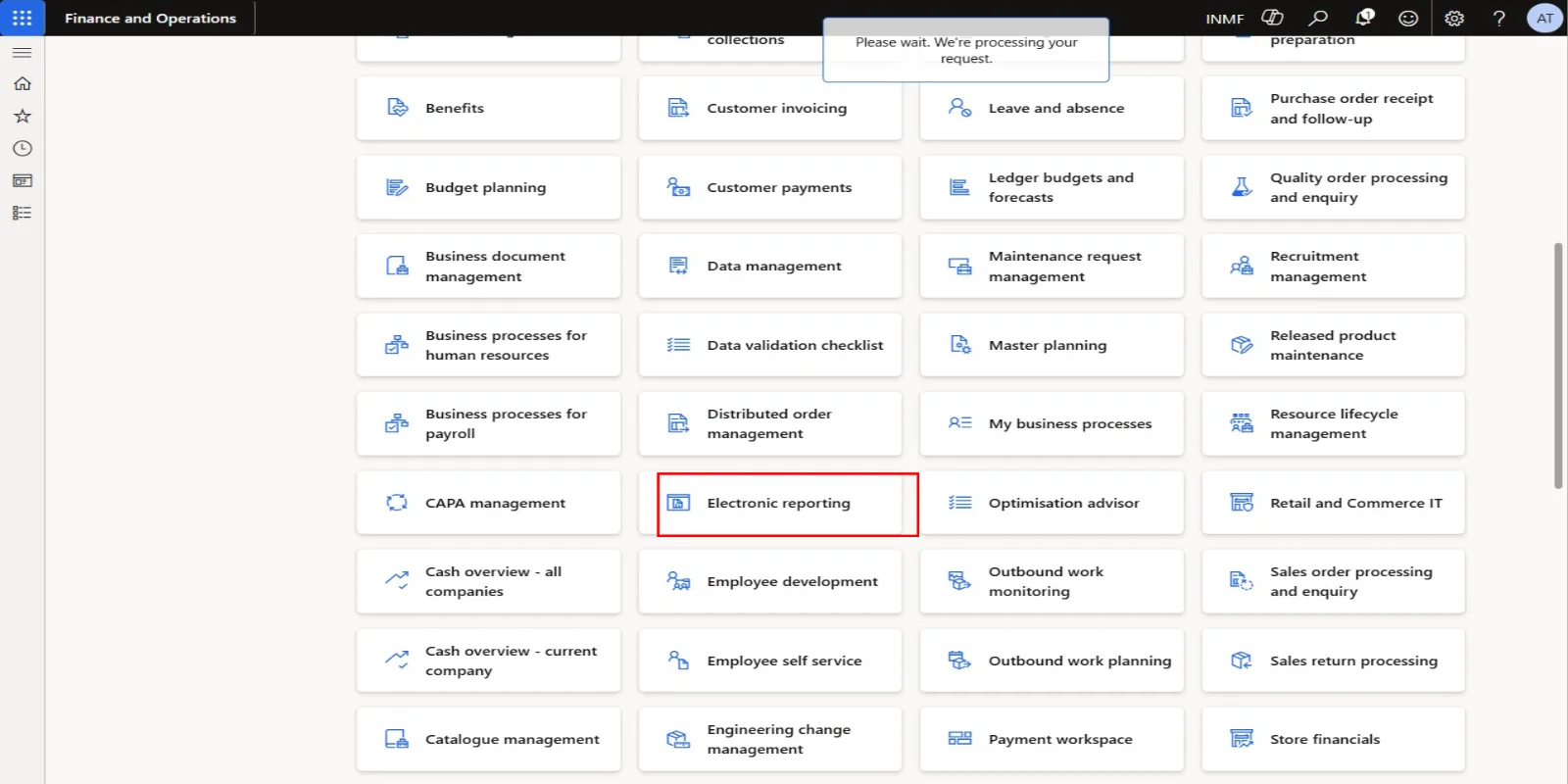
- Go to All workspaces > Electronic reporting or Organisation administration > Workspaces > Electronic reporting.
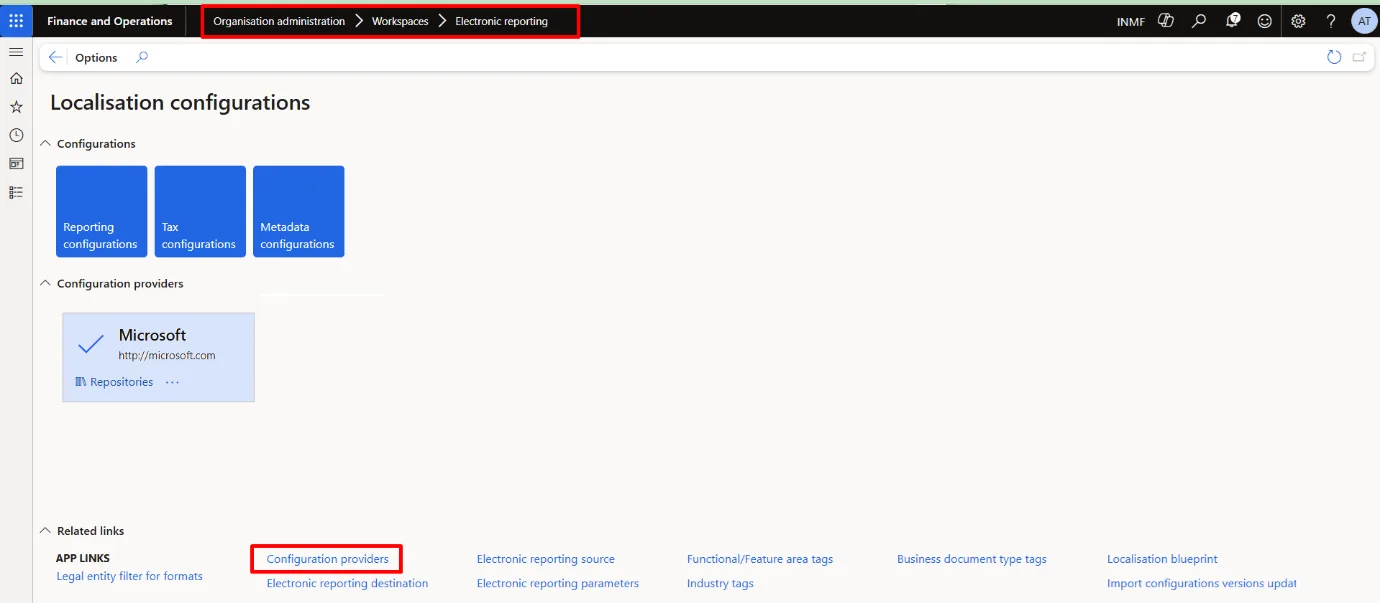
- Click Configuration providers.
- Click New.
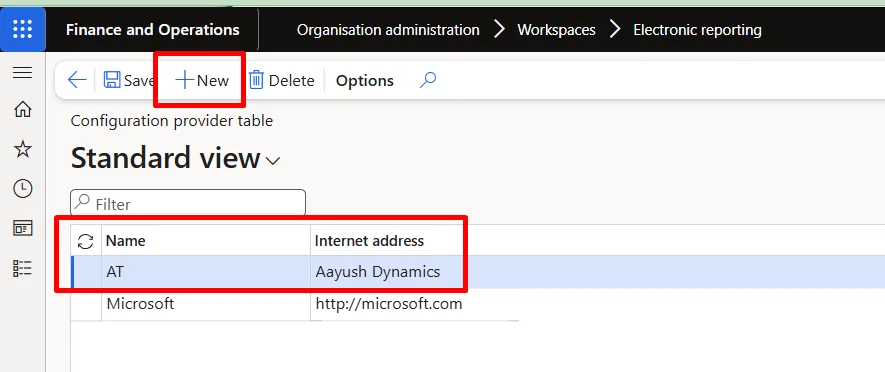
- In the Name field, type AT.
- In the Internet address field, type Aayush Dynamics.
- Click Save.
- Close the page.
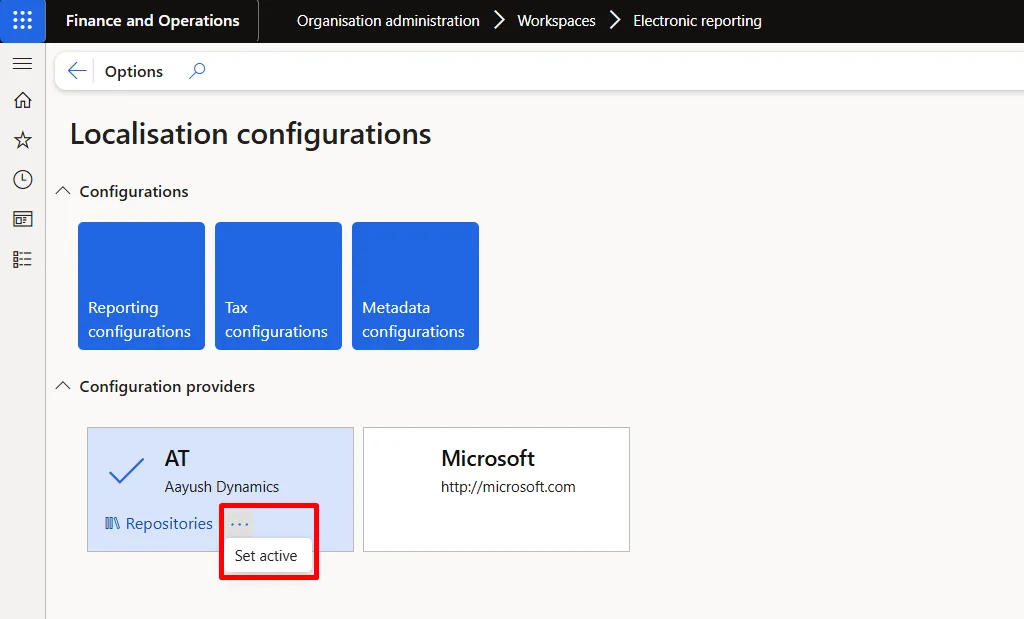
- Under Configuration providers, select the AT tile.
- On the AT tile, select the ellipsis (…) and click Set active. Configurations created from this point are owned by the active provider.
Part B – Create the derived tax configuration
- Go to All workspaces > Electronic reporting.
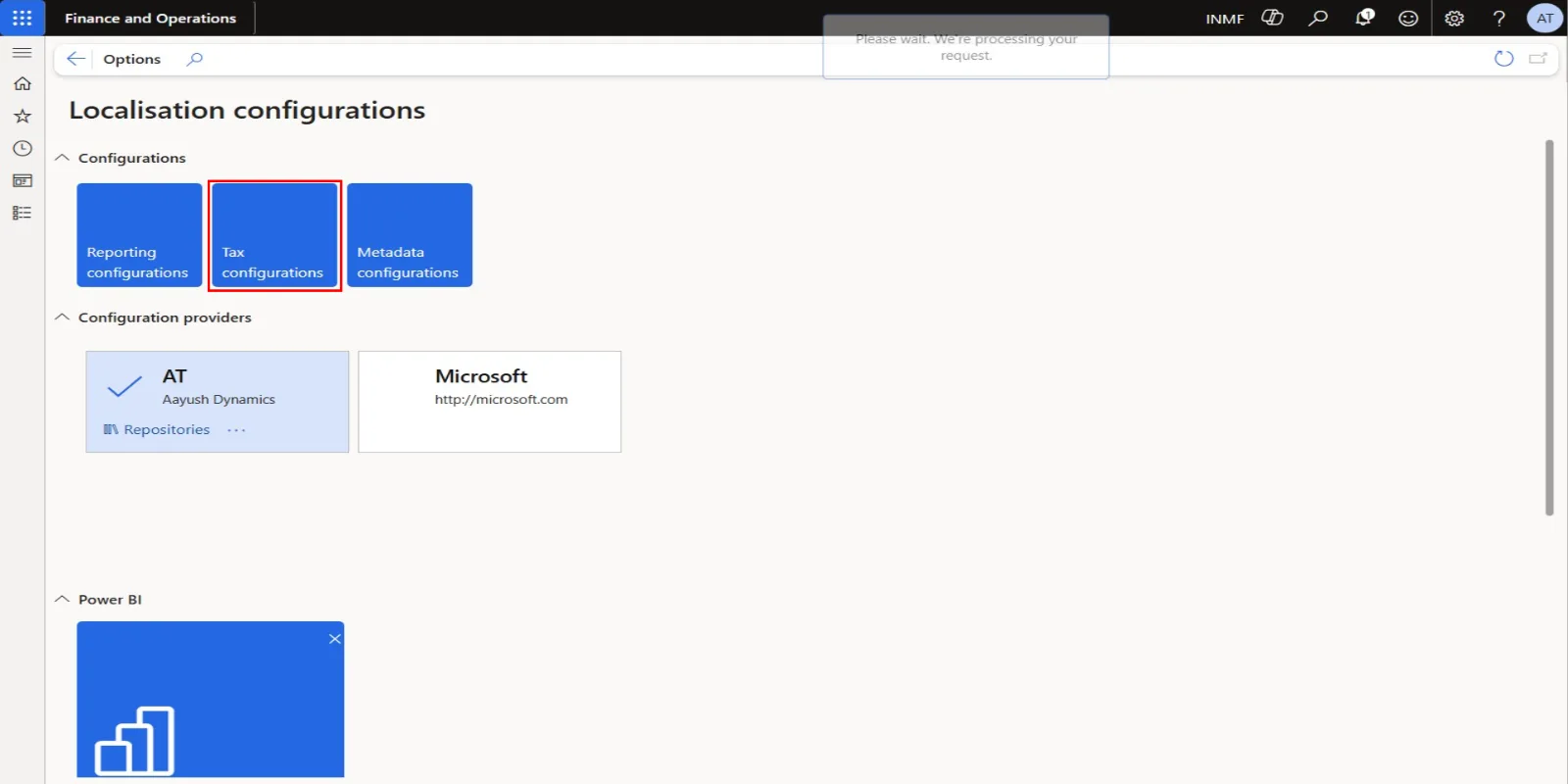
- Click Tax configurations.
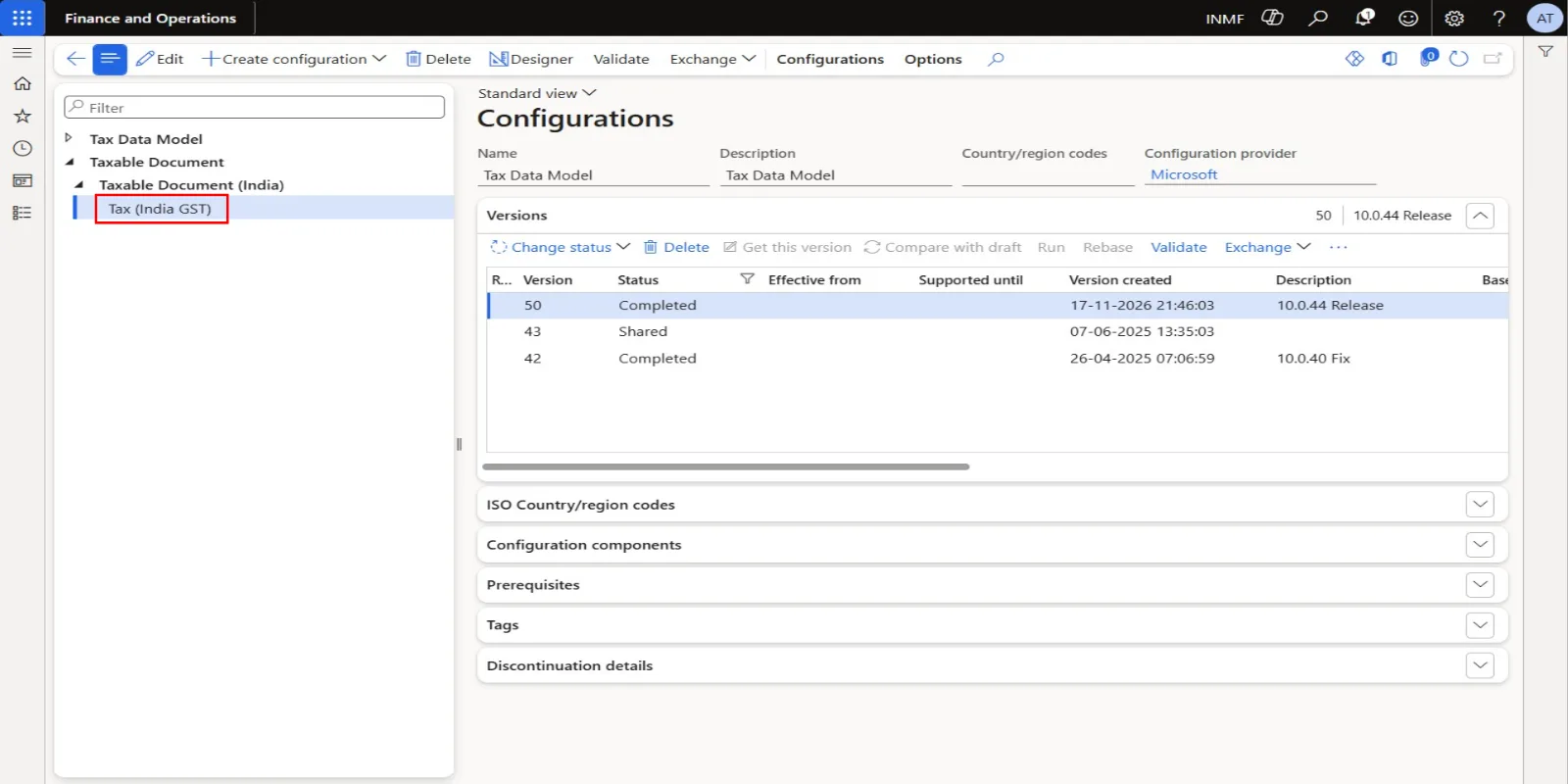
- In the tree, expand 'Taxable Document'.
- In the tree, expand 'Taxable Document (India)'.
- In the tree, select 'Tax (India GST)'.
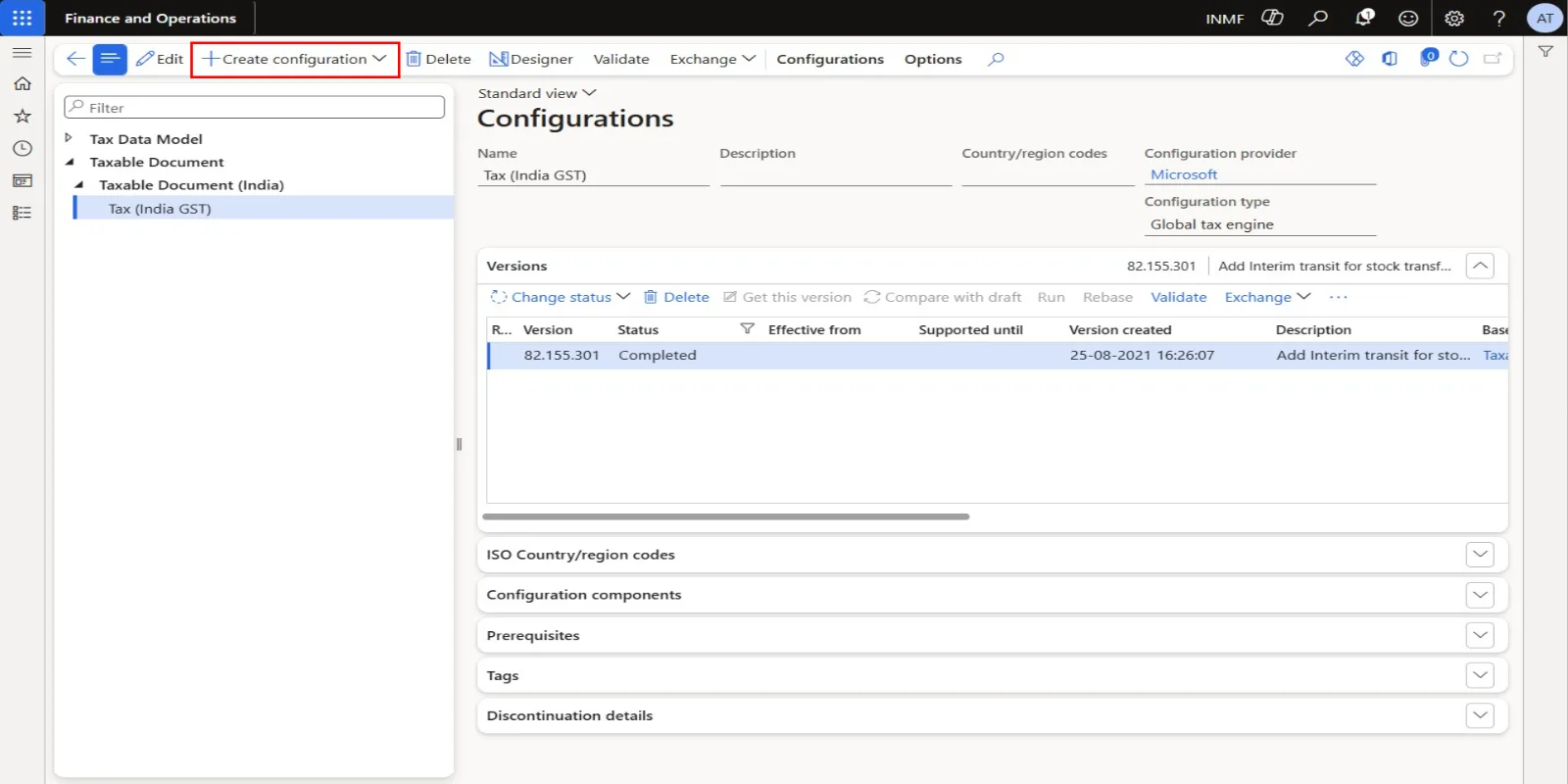
- Click Create configuration to open the drop-down dialog.
- In the New field, select Tax configuration derived from Name: Tax (India GST), Microsoft.
- In the Name field, type AT Tax (India GST).
- In the Description field, type AT Tax (India GST).
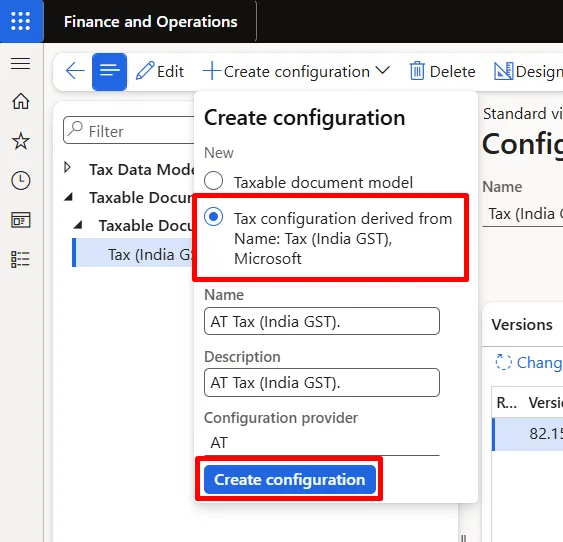
- Click Create configuration. A draft version of AT Tax (India GST) is created under Tax (India GST) with AT as the configuration provider.
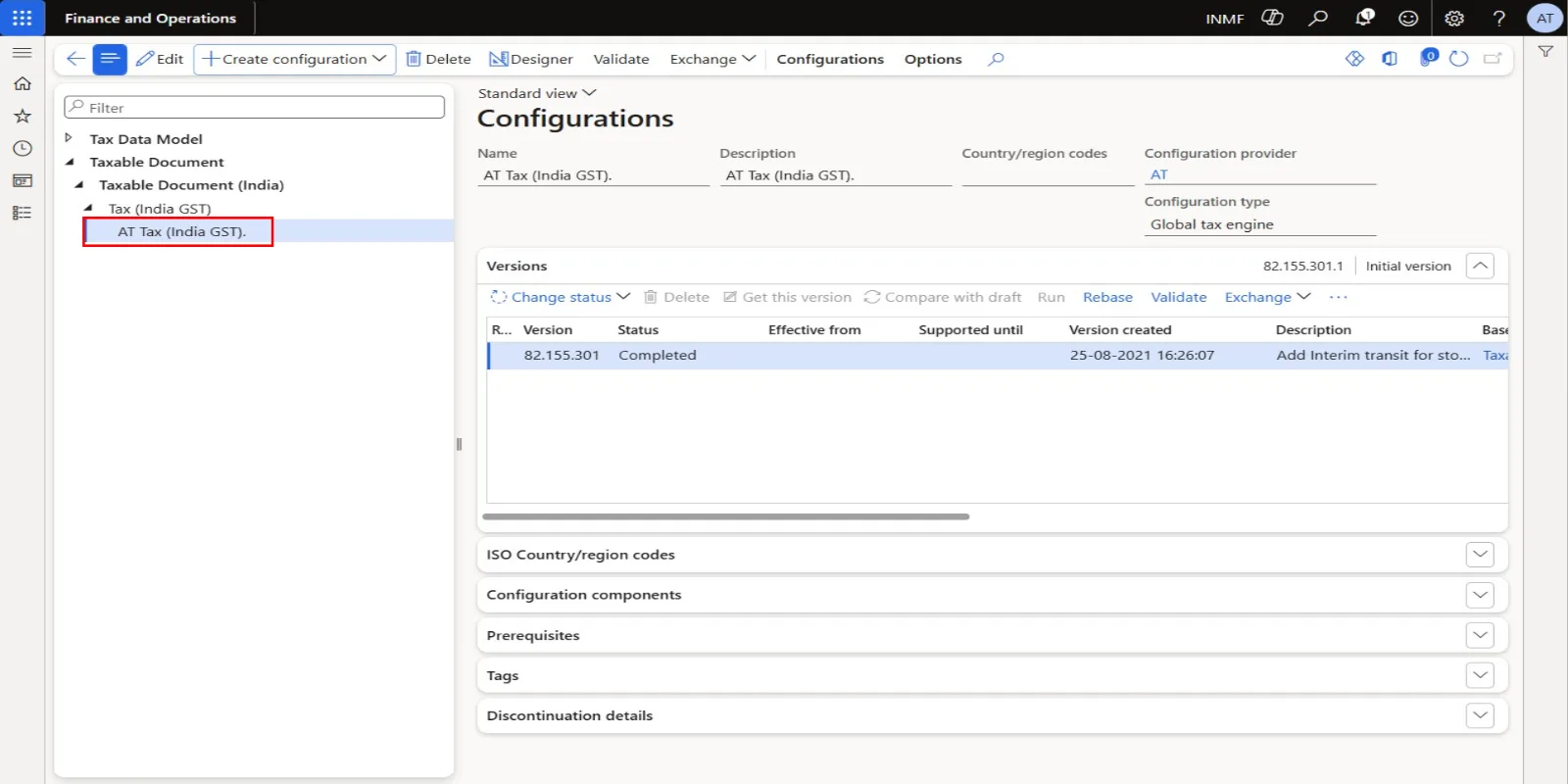
Part C – Change the RCM postings in the designer
- Click Designer to open the tax document designer for AT Tax (India GST).
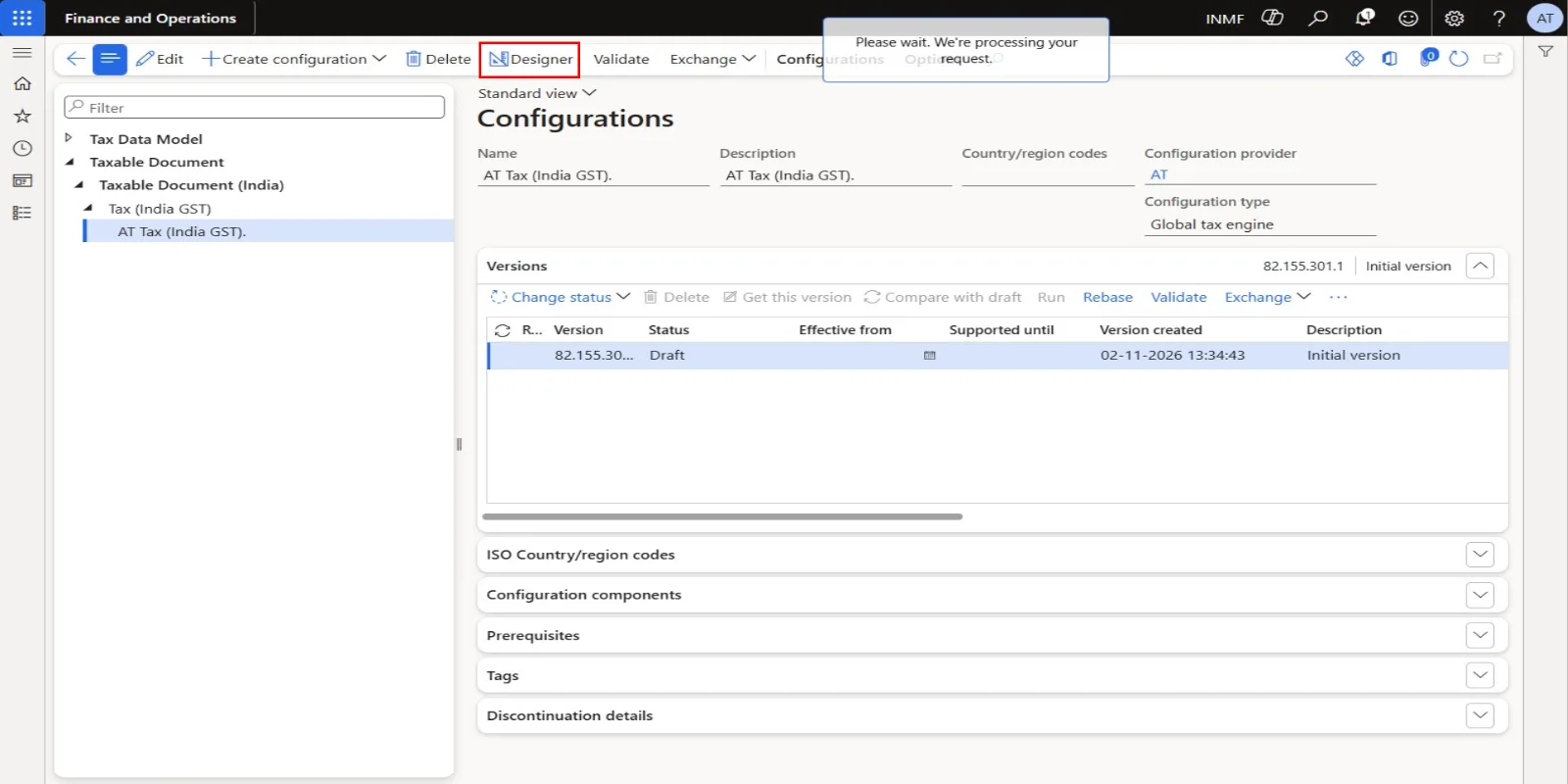
CGST
- In the tree, expand 'Tax document\Header\Lines\GST'.
- In the tree, select 'Tax document\Header\Lines\GST\CGST'.
- Click the Postings tab.
- In the Details grid, select the Interim Recoverable Amount tax measure line (Debit: Interim Recoverable). Sort order 1 – Purchase - Item is selected by default in the Overview grid.
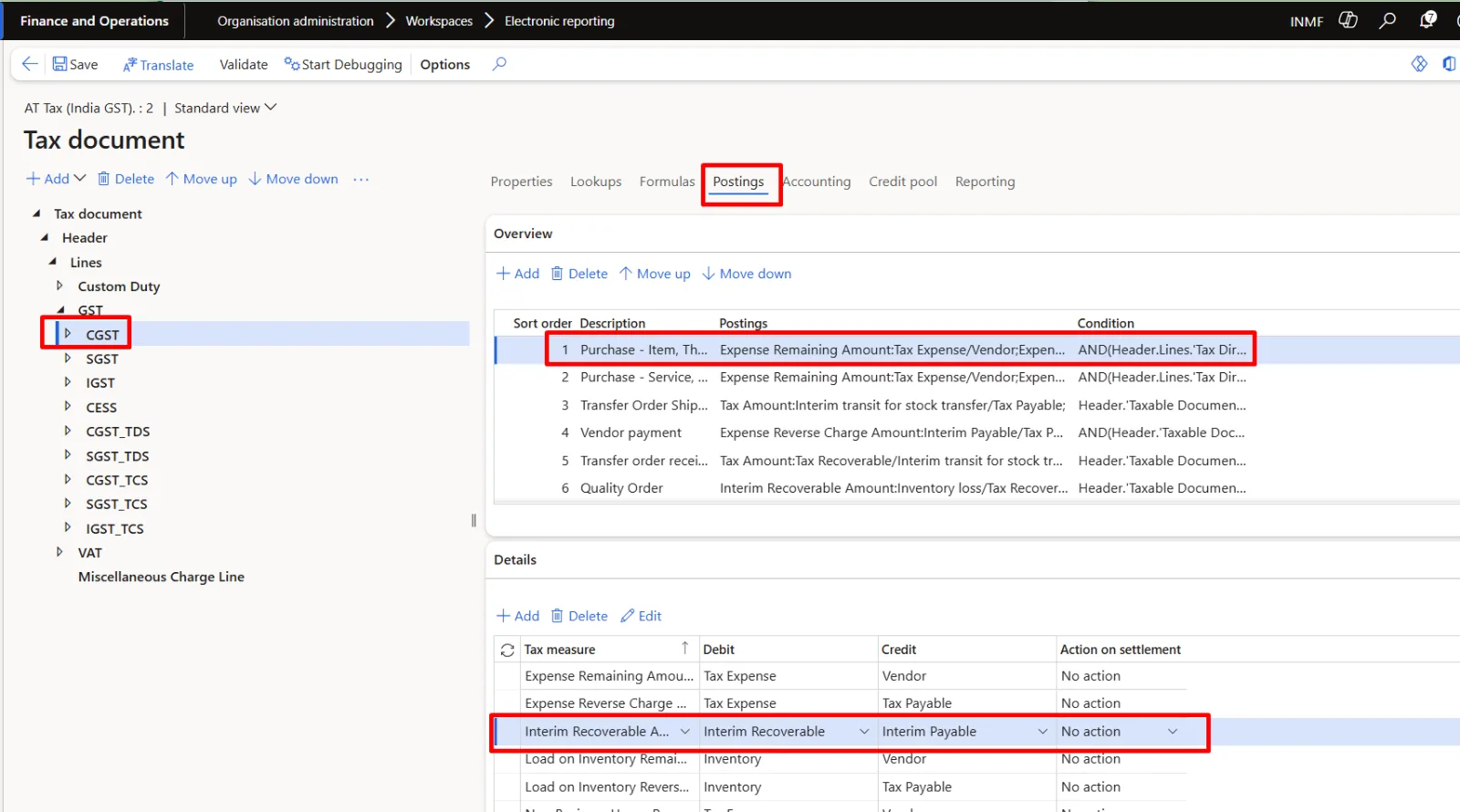
- Open the Credit lookup on that line. The standard value is Tax Payable.
- In the lookup, select Interim Payable.
- Confirm the selection. The line now reads Debit Interim Recoverable / Credit Interim Payable.
- In the Overview grid, select sort order 2 – Purchase - Service.
- In the Details grid, select the Interim Recoverable Amount tax measure line (Debit: Interim Recoverable).
- Open the Credit lookup on that line. The standard value is Tax Payable.
- In the lookup, select Interim Payable.
- Confirm the selection. The line now reads Debit Interim Recoverable / Credit Interim Payable.
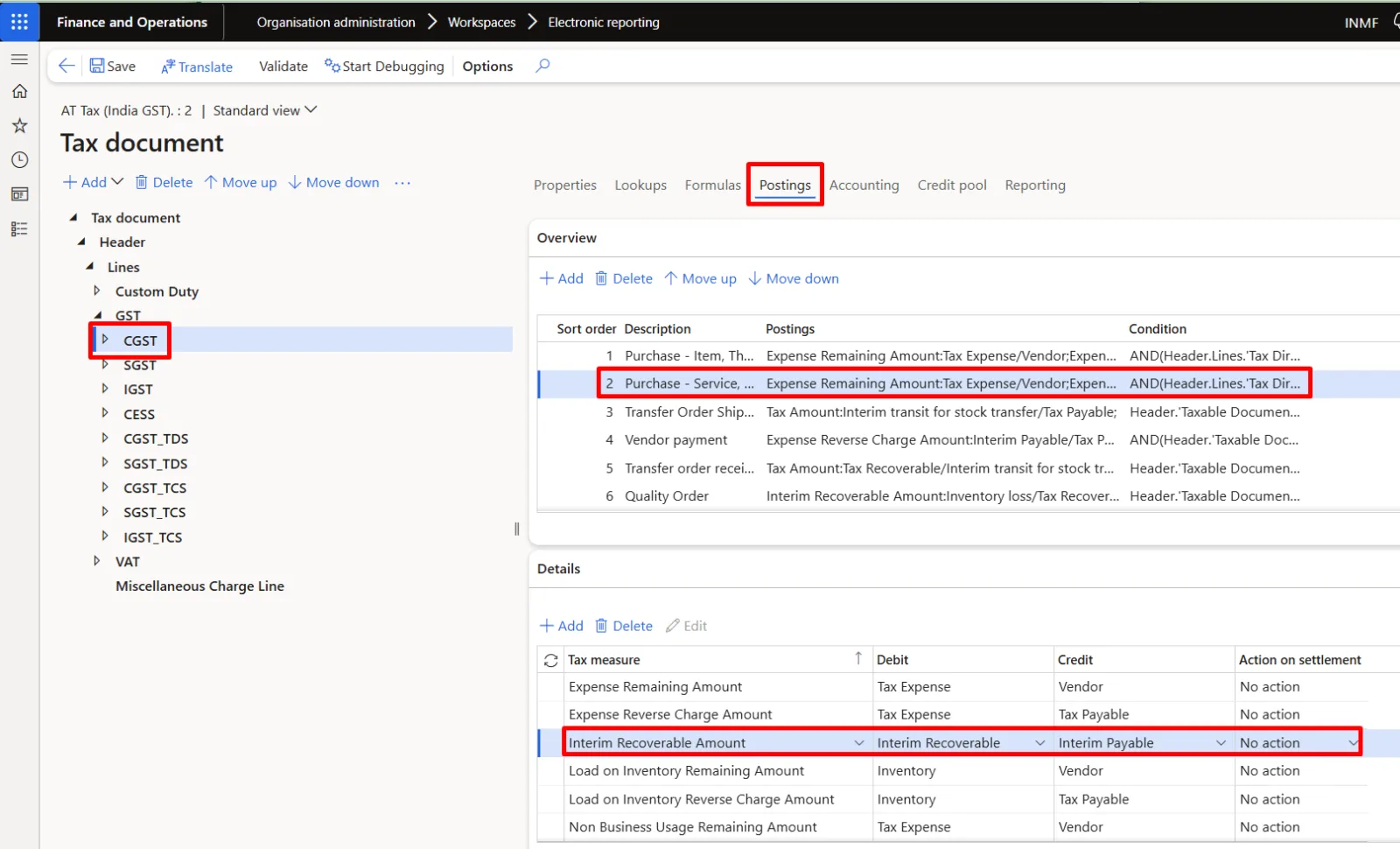
SGST – repeat the same change for both purchase postings.
- In the tree, select 'Tax document\Header\Lines\GST\SGST'.
- In the Details grid, select the Interim Recoverable Amount tax measure line (Debit: Interim Recoverable). Sort order 1 – Purchase - Item is selected by default.
- Open the Credit lookup on that line. The standard value is Tax Payable.
- In the lookup, select Interim Payable.
- Confirm the selection. The line now reads Debit Interim Recoverable / Credit Interim Payable.
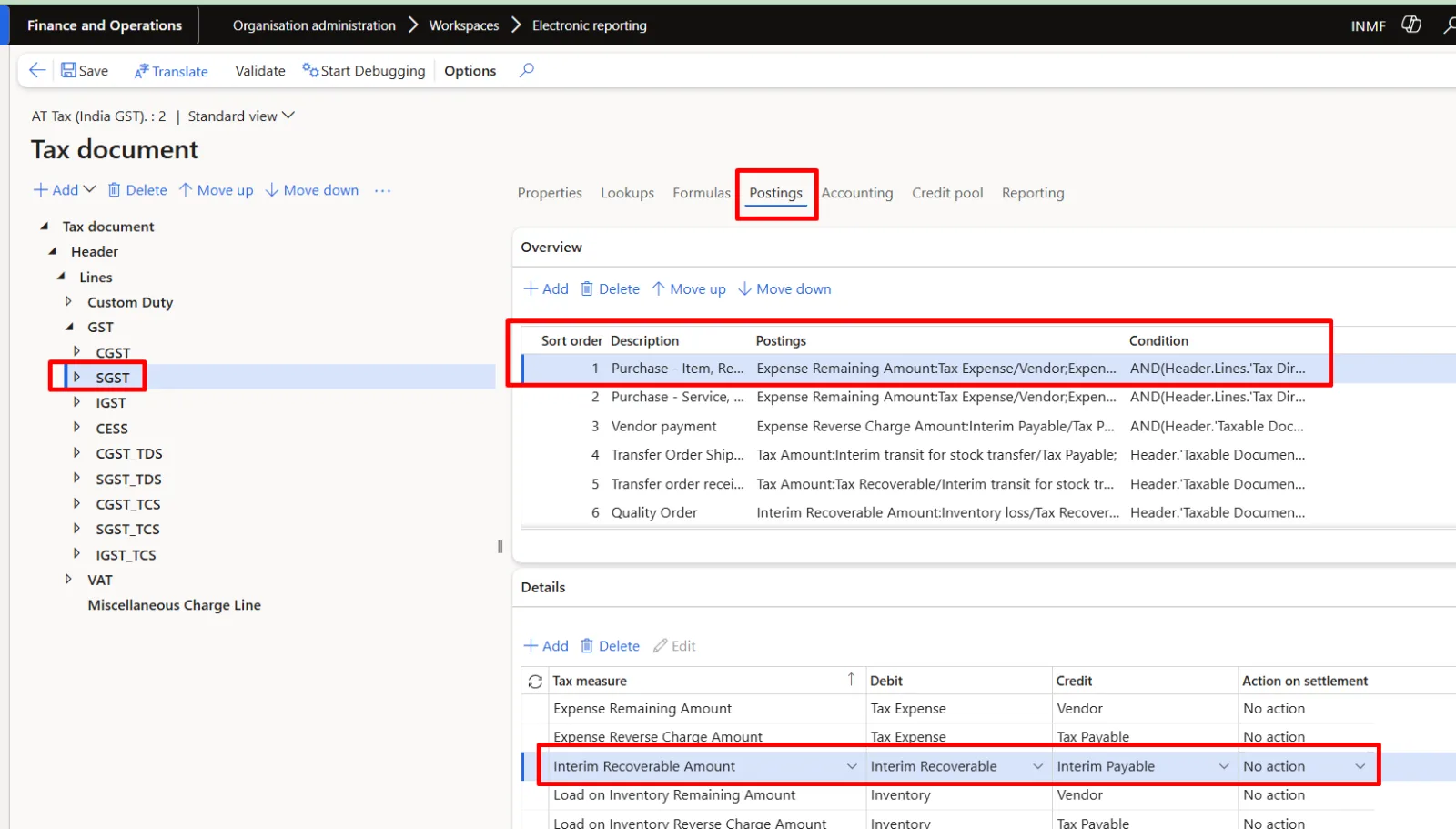
- In the Overview grid, select sort order 2 – Purchase - Service.
- In the Details grid, select the Interim Recoverable Amount tax measure line (Debit: Interim Recoverable).
- Open the Credit lookup on that line. The standard value is Tax Payable.
- In the lookup, select Interim Payable.
- Confirm the selection. The line now reads Debit Interim Recoverable / Credit Interim Payable.
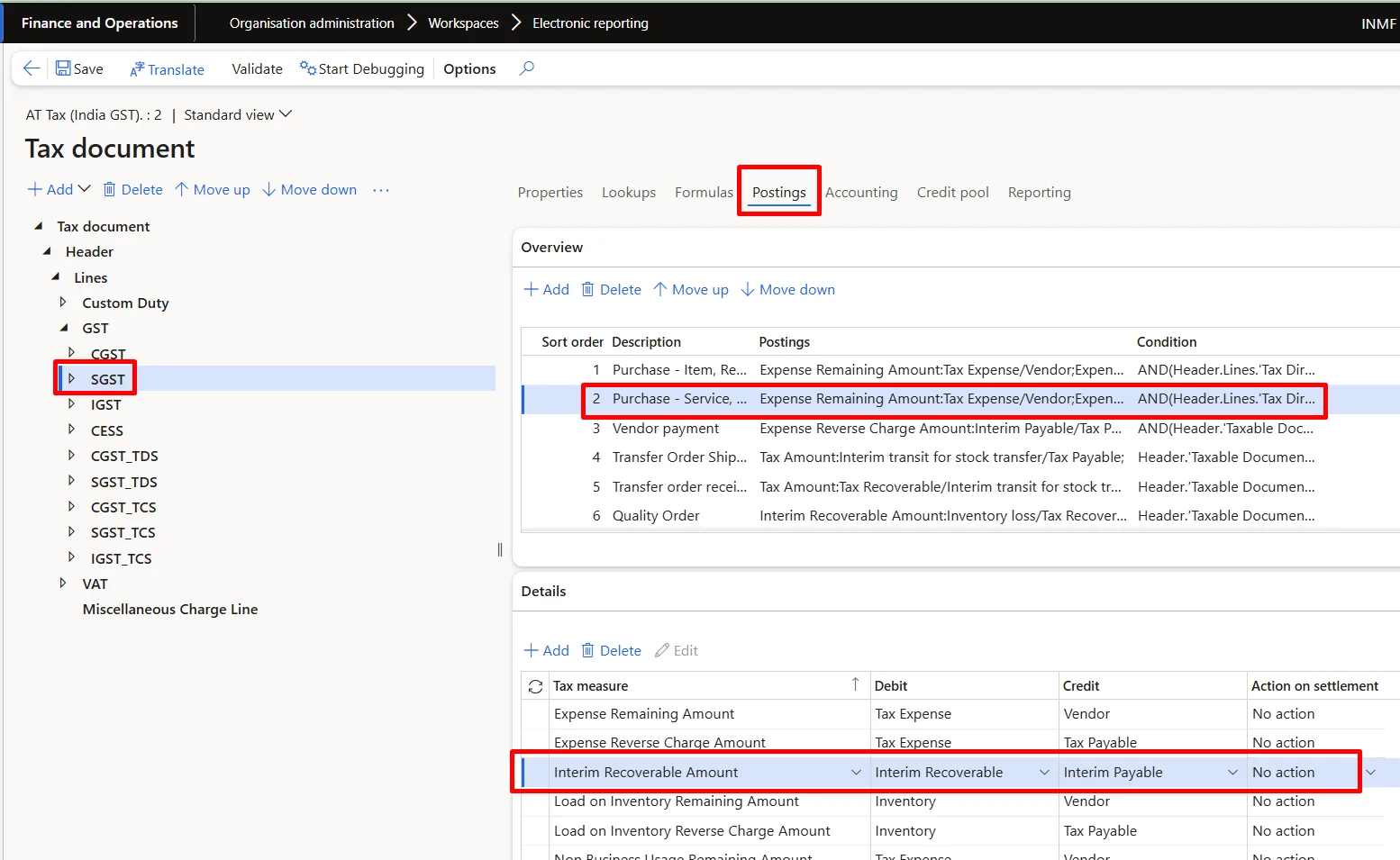
IGST – repeat the change for the domestic purchase postings.
- In the tree, select 'Tax document\Header\Lines\GST\IGST'.
- In the Details grid, select the Interim Recoverable Amount tax measure line (Debit: Interim Recoverable). Sort order 1 – Domestic Purchase - Item is selected by default.
- Open the Credit lookup on that line. The standard value is Tax Payable.
- In the lookup, select Interim Payable.
- Confirm the selection. The line now reads Debit Interim Recoverable / Credit Interim Payable.
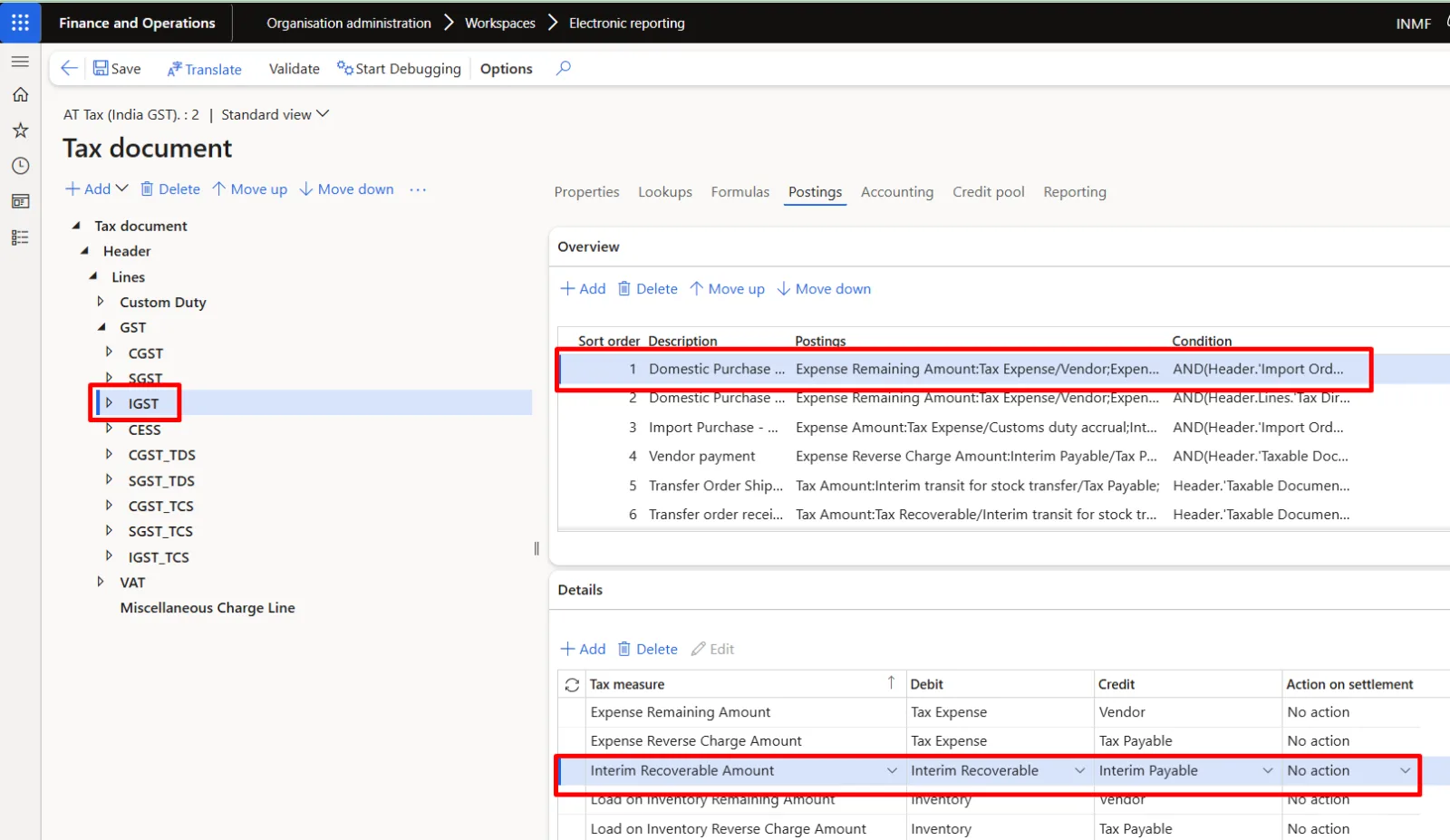
- In the Overview grid, select sort order 2 – Domestic Purchase - Service.
- In the Details grid, select the Interim Recoverable Amount tax measure line (Debit: Interim Recoverable).
- Open the Credit lookup on that line. The standard value is Tax Payable.
- In the lookup, select Interim Payable.
- Confirm the selection. The line now reads Debit Interim Recoverable / Credit Interim Payable.
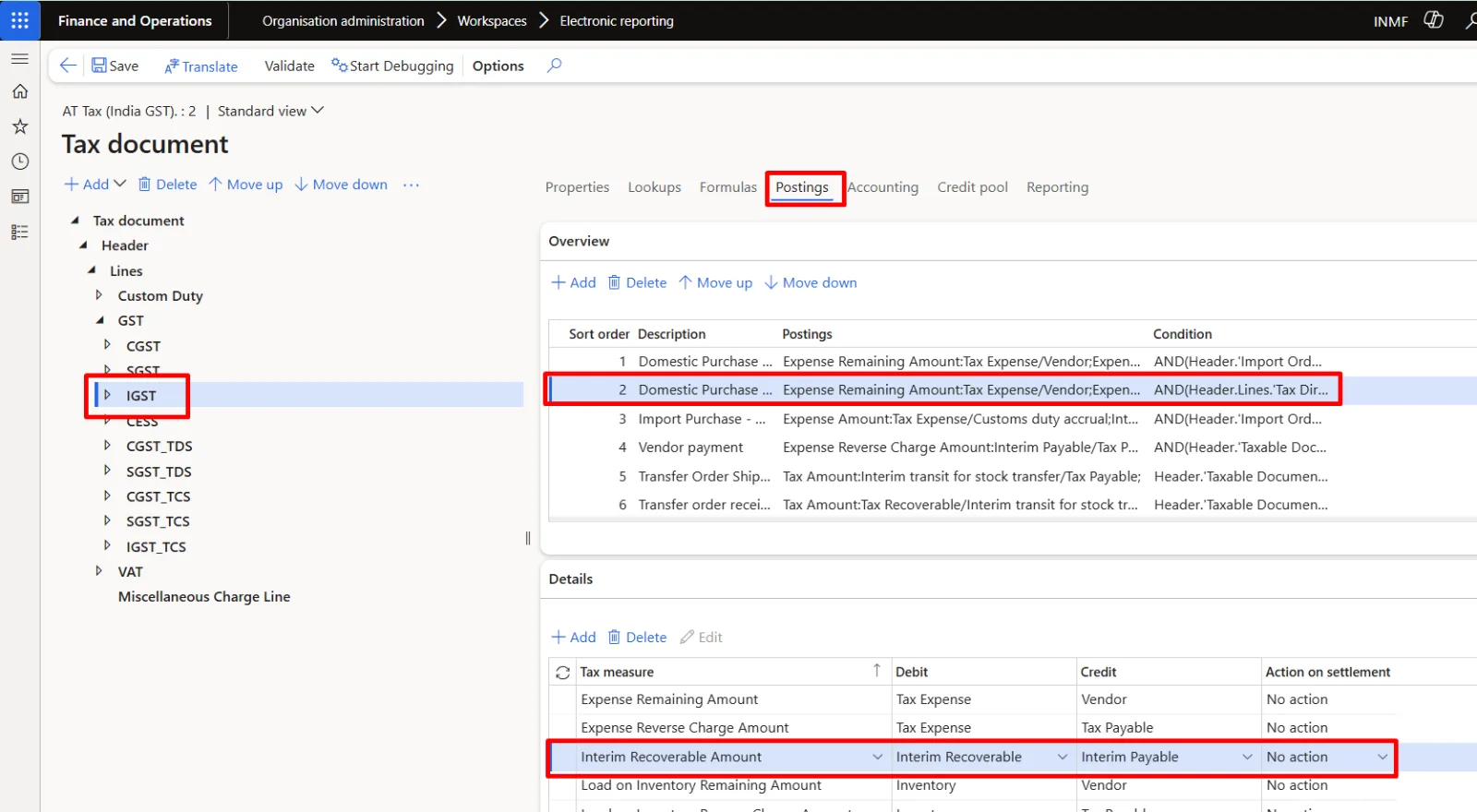
- Click Save, and then close the designer page.
Part D – Complete the configuration version
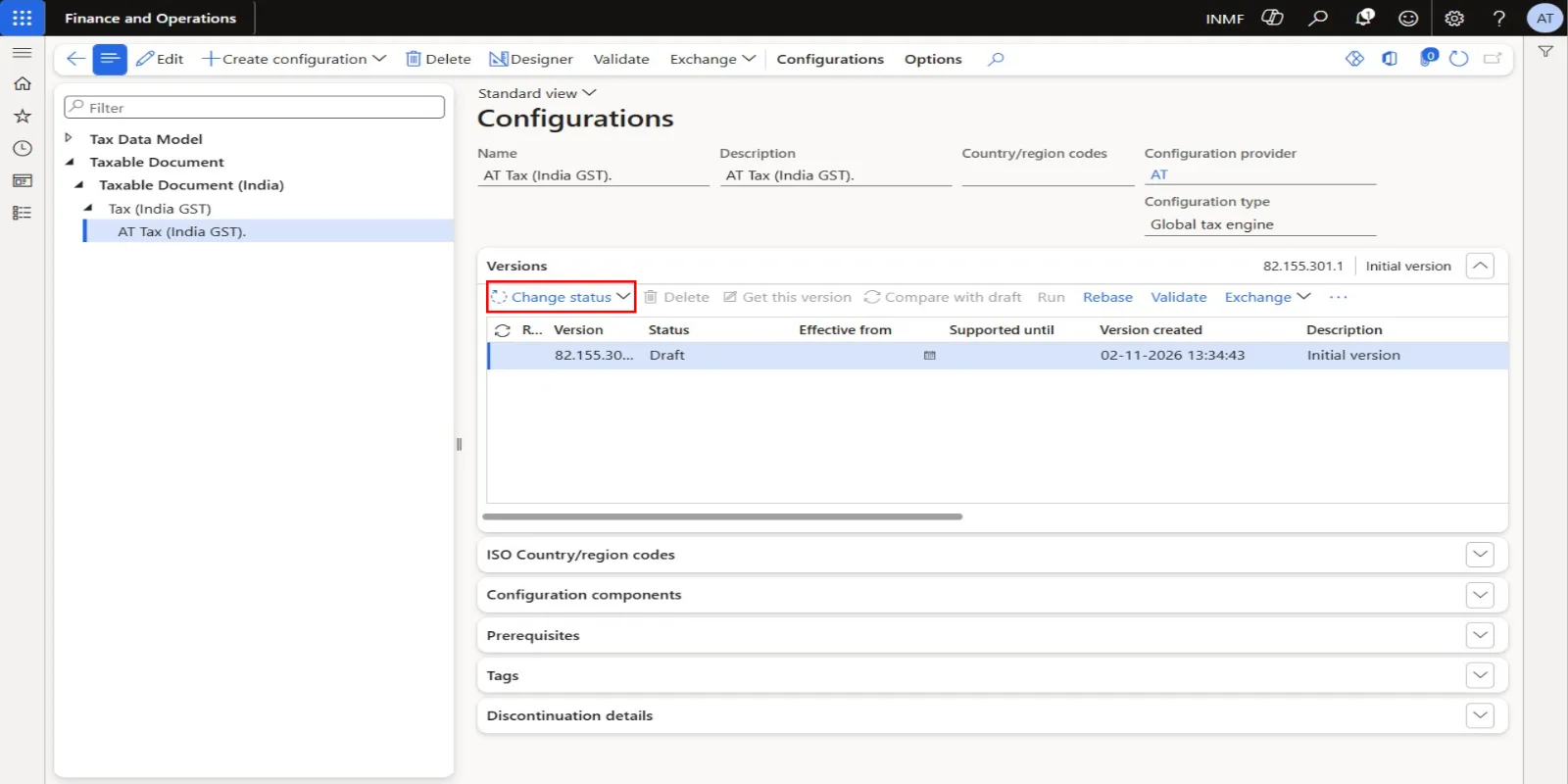
- Click Change status > Complete.
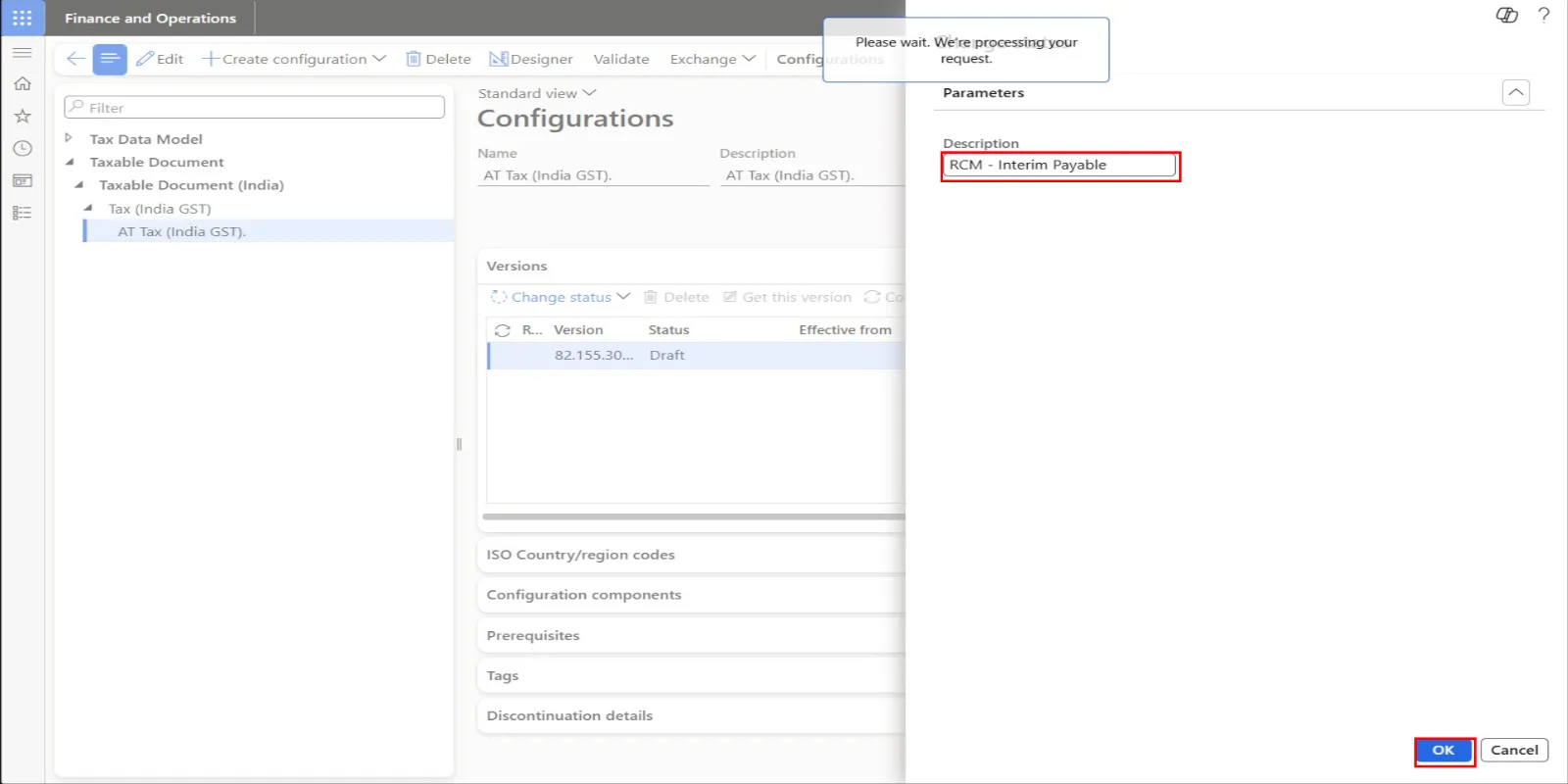
- In the Description field, type RCM Accounting.
- Click OK. The version status changes from Draft to Completed. A new draft version (version 2) is created automatically for future changes. Only a completed version can be selected in Tax setup.
- Close the page.
Part E – Deploy and activate in Tax setup
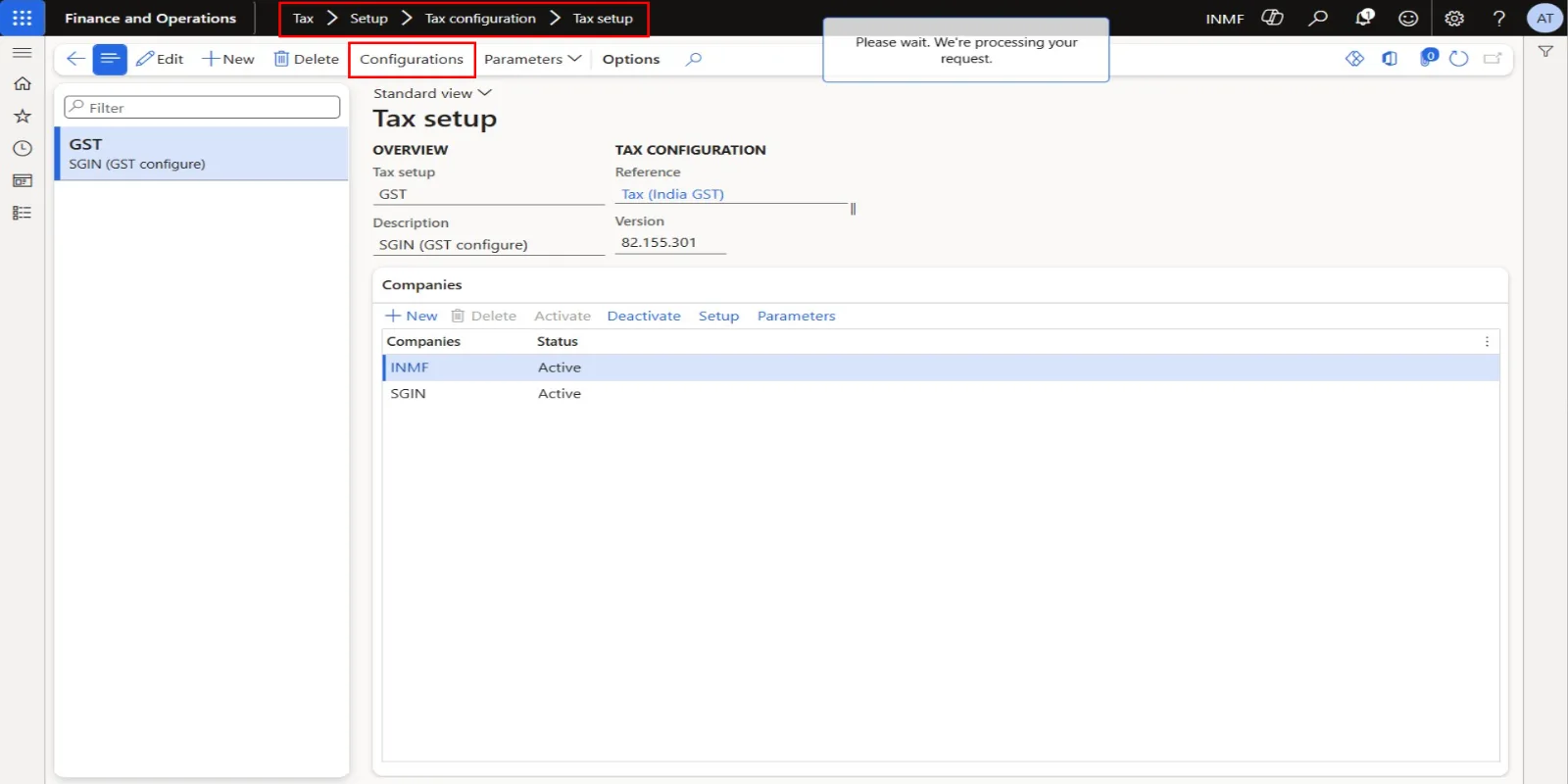
- Go to Tax > Setup > Tax configuration > Tax setup and select the tax setup record that the legal entity is attached to (GST). The activated configuration applies to every company listed under Companies on this tax setup.
- Click Configurations.
- Click New under Available configurations.
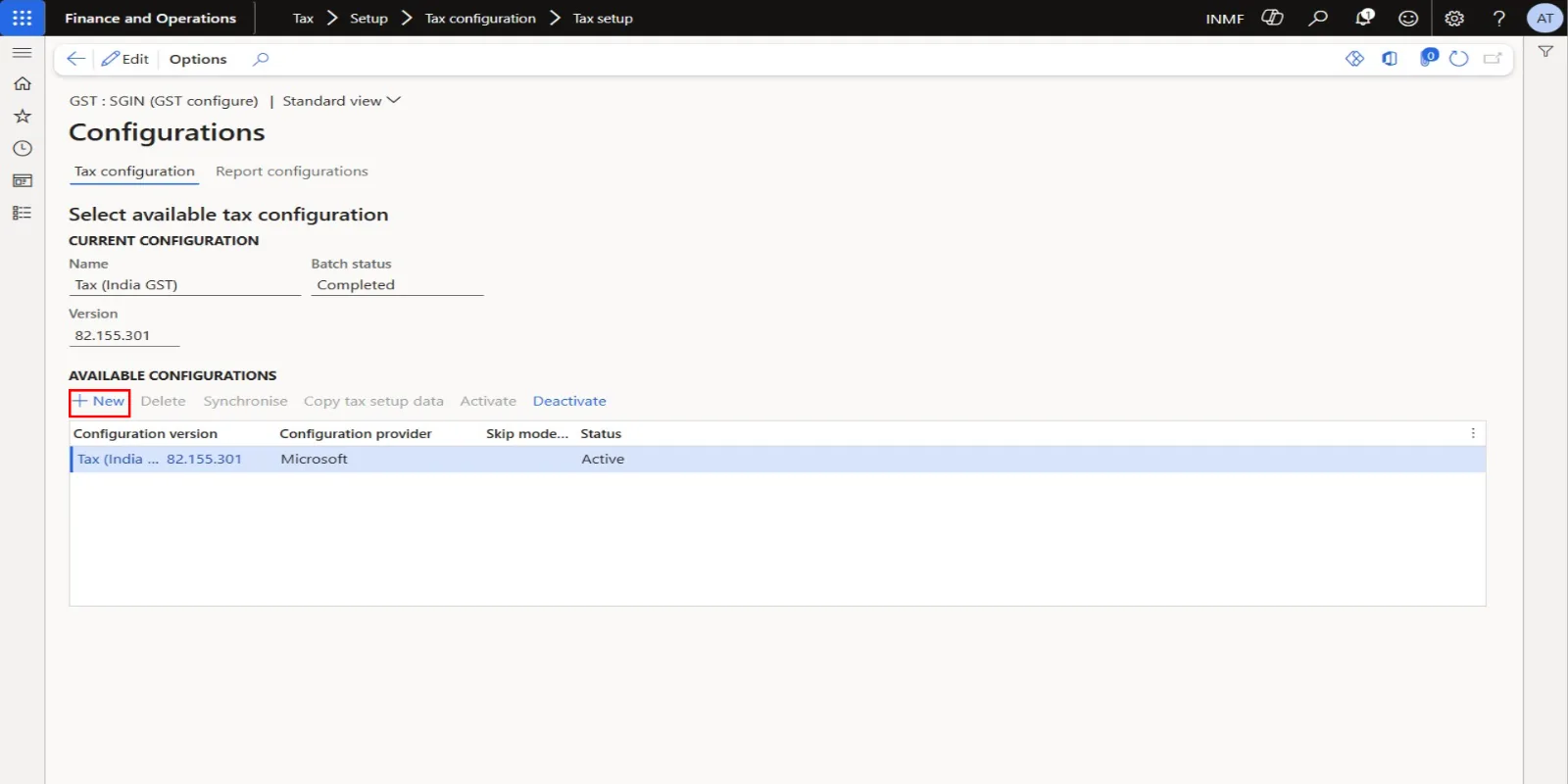
- Open the Configuration version lookup and select AT Tax (India GST), revision 1.
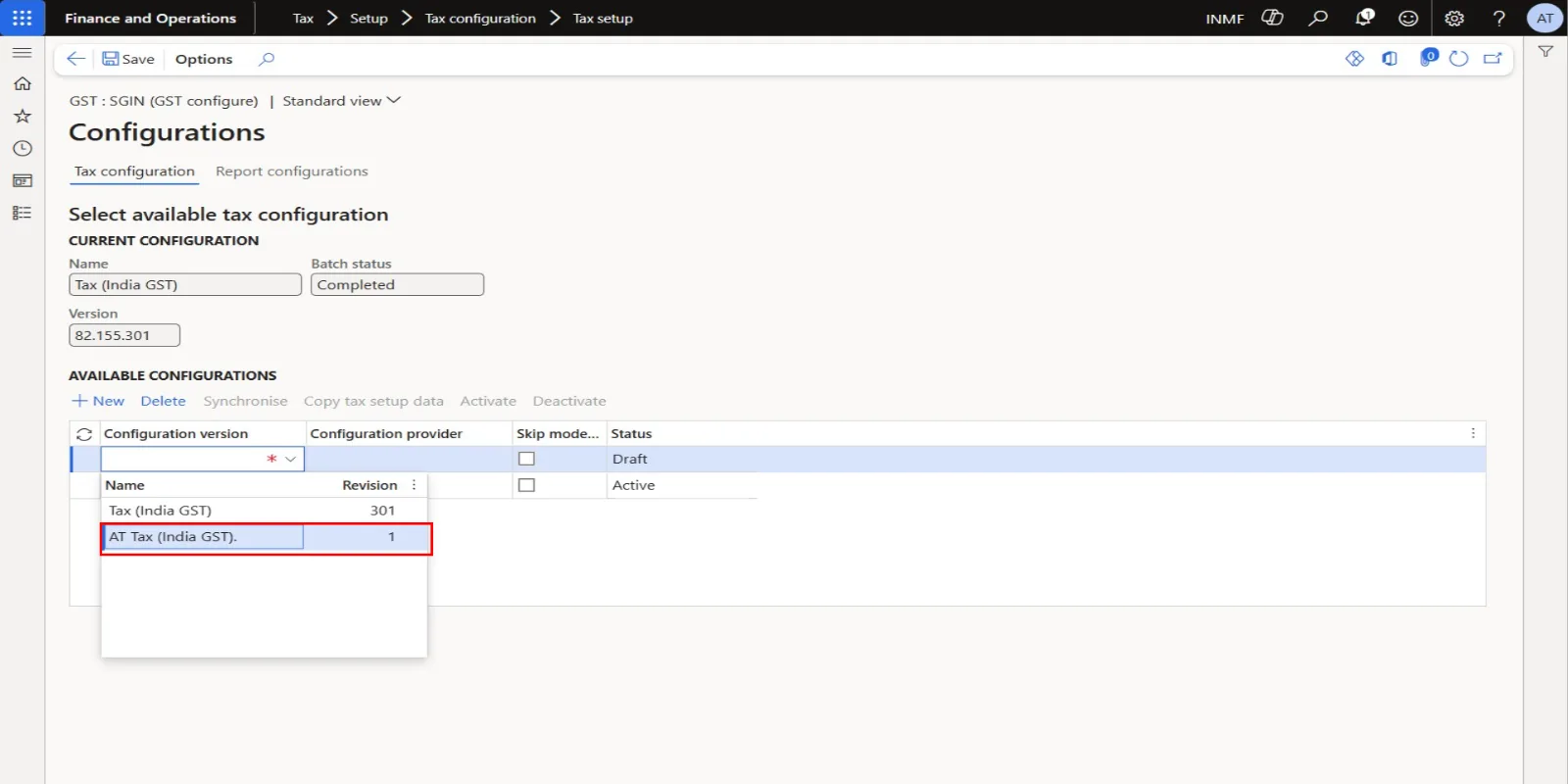
- Confirm the selection. The row shows version 82.155.301.1, provider AT, status Draft.
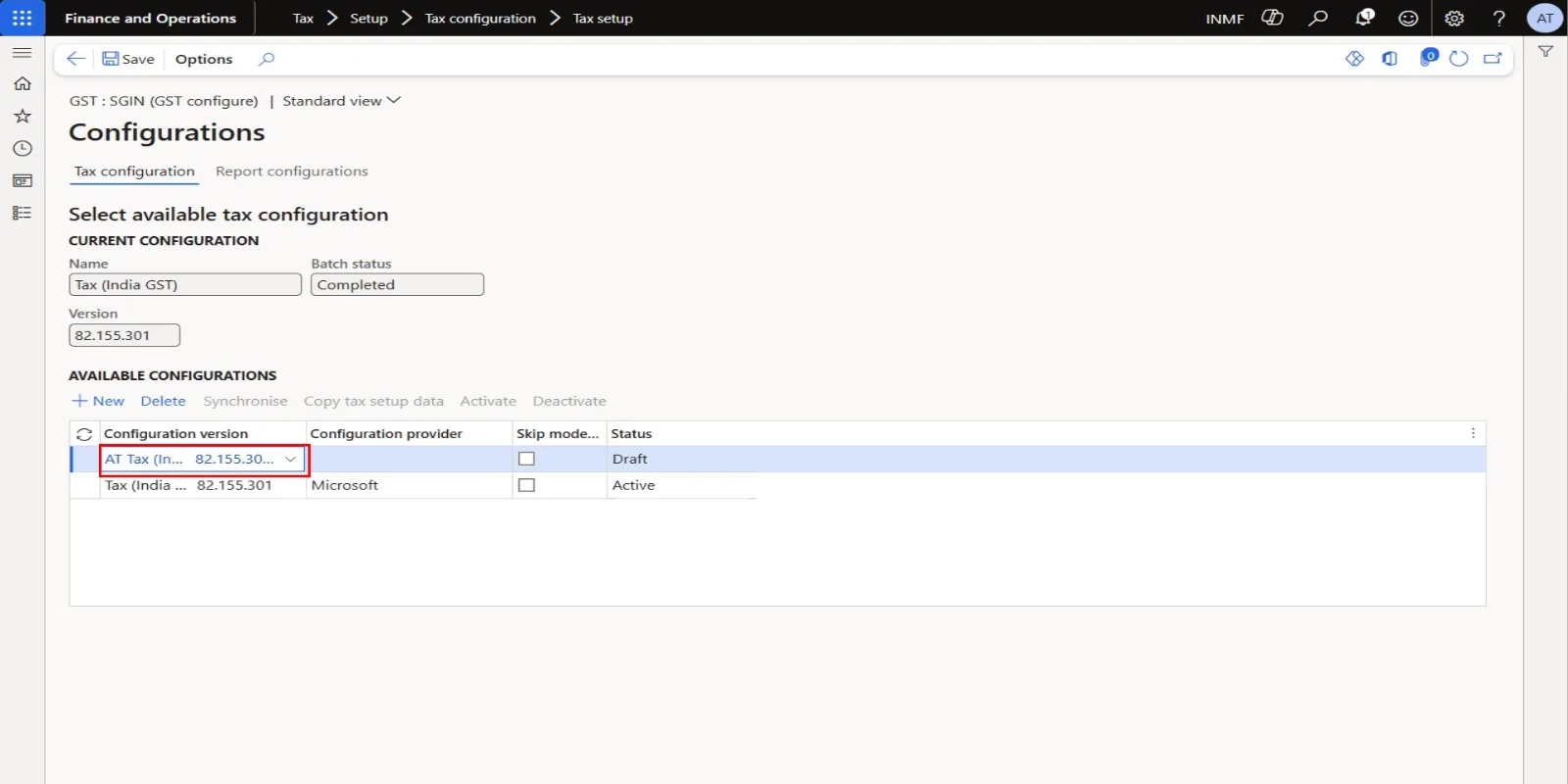
- Click Save.
- Click Synchronise to synchronise the tax setup with the derived configuration.
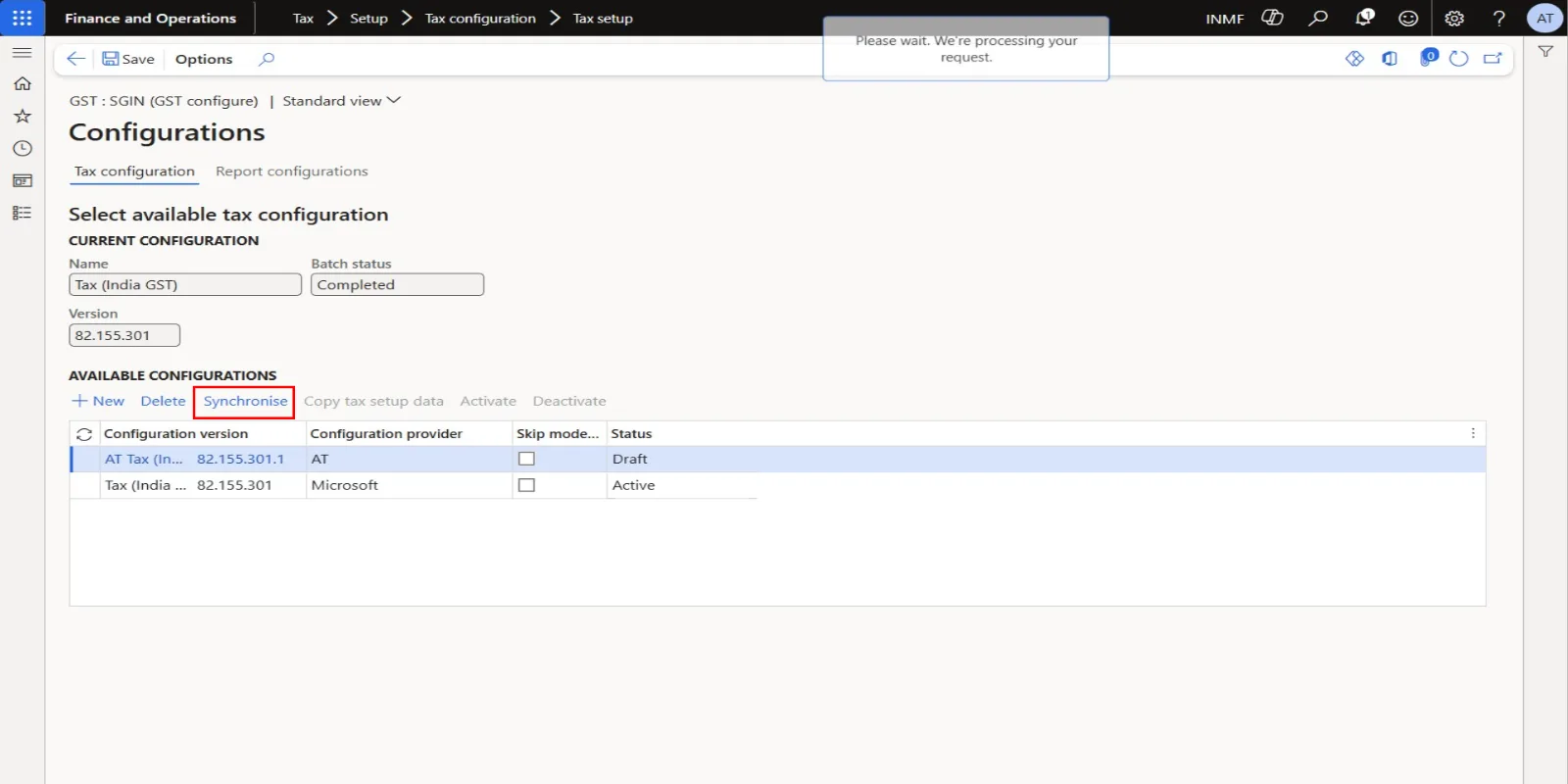
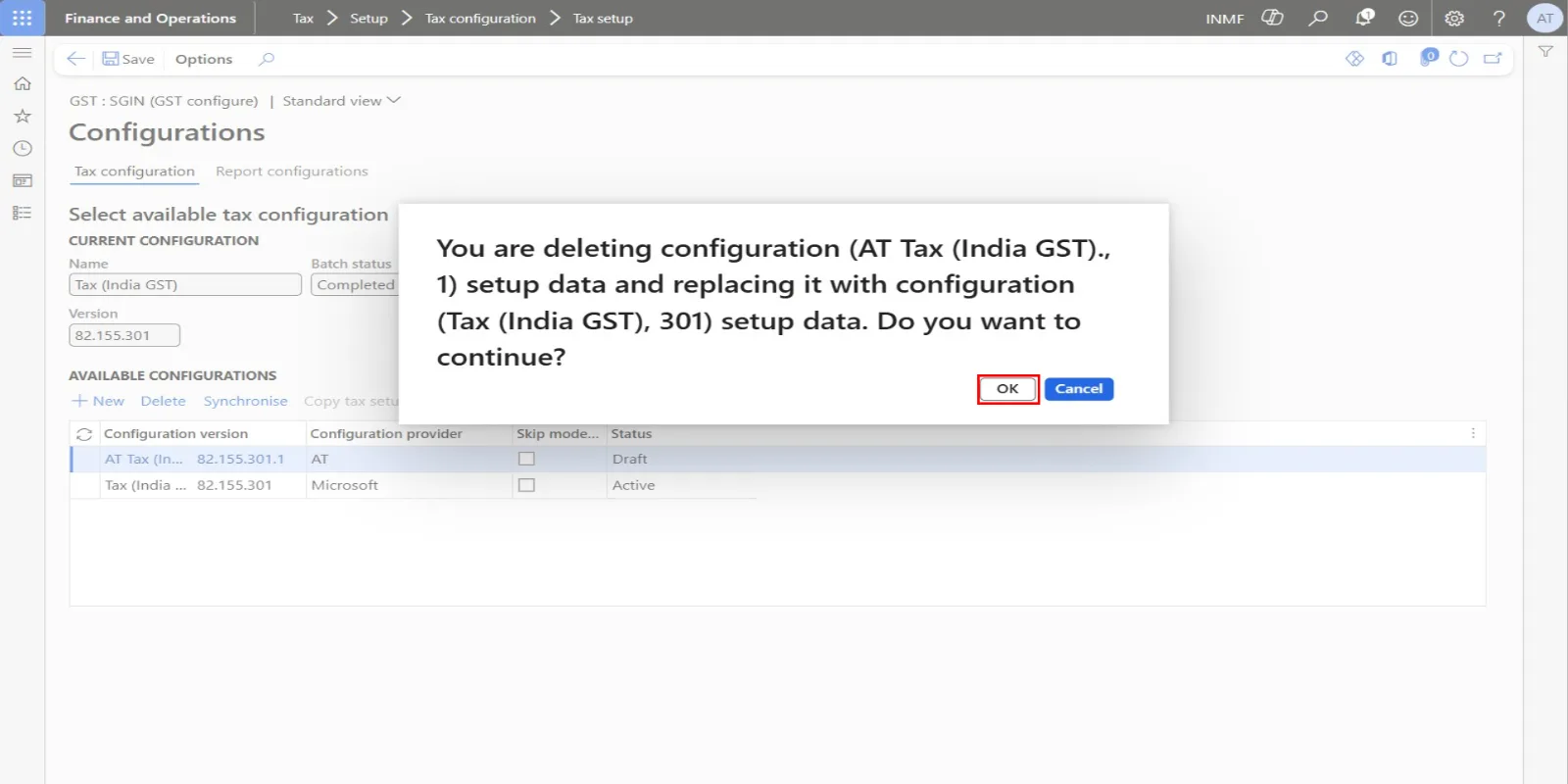
- Click OK in the Copy tax setup data dialog, keeping Copy tax setup data from set to Yes.
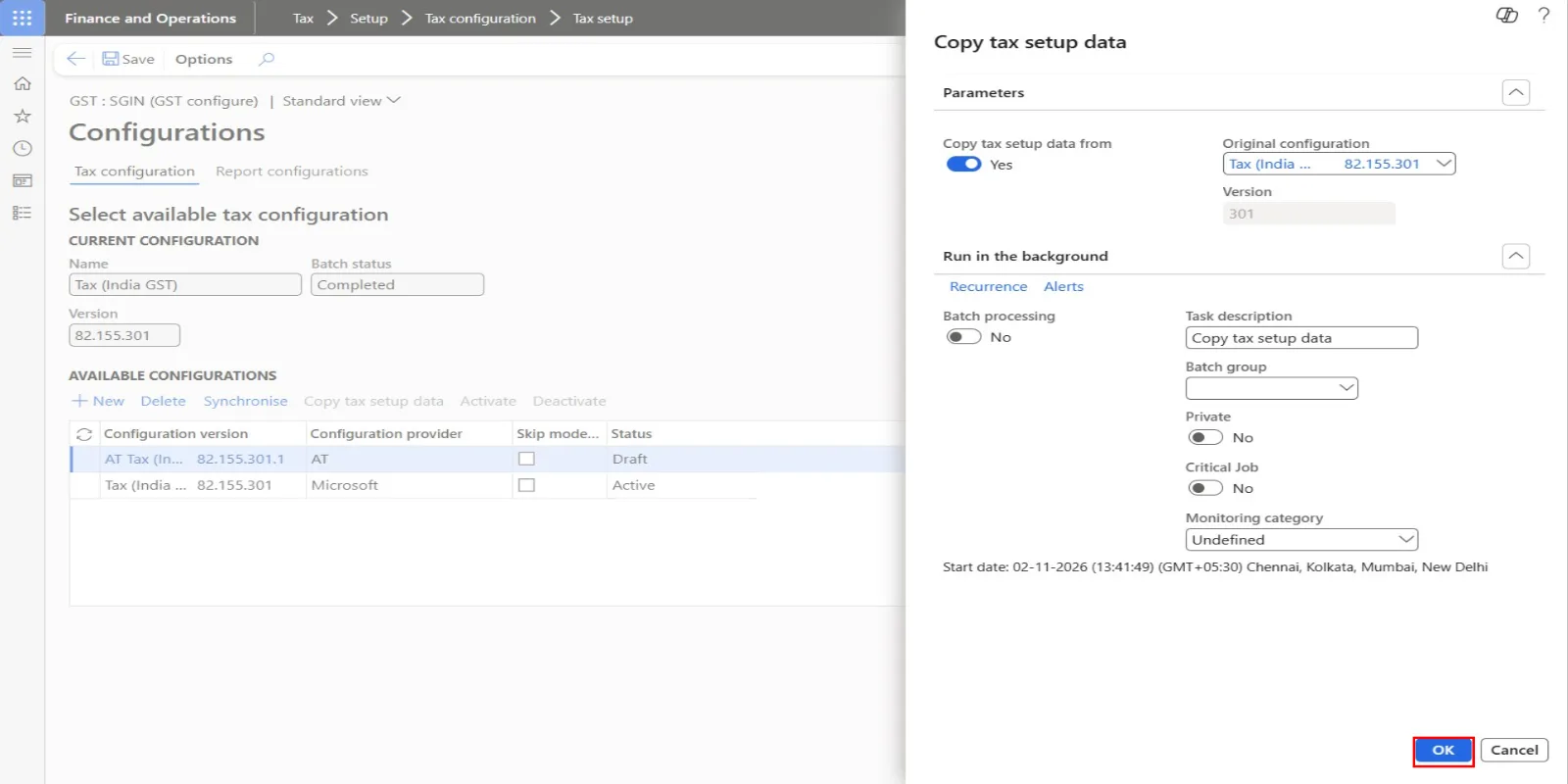
- Click OK on the confirmation message to replace the setup data of AT Tax (India GST) with the setup data of Tax (India GST). The system shows "Migration completed."
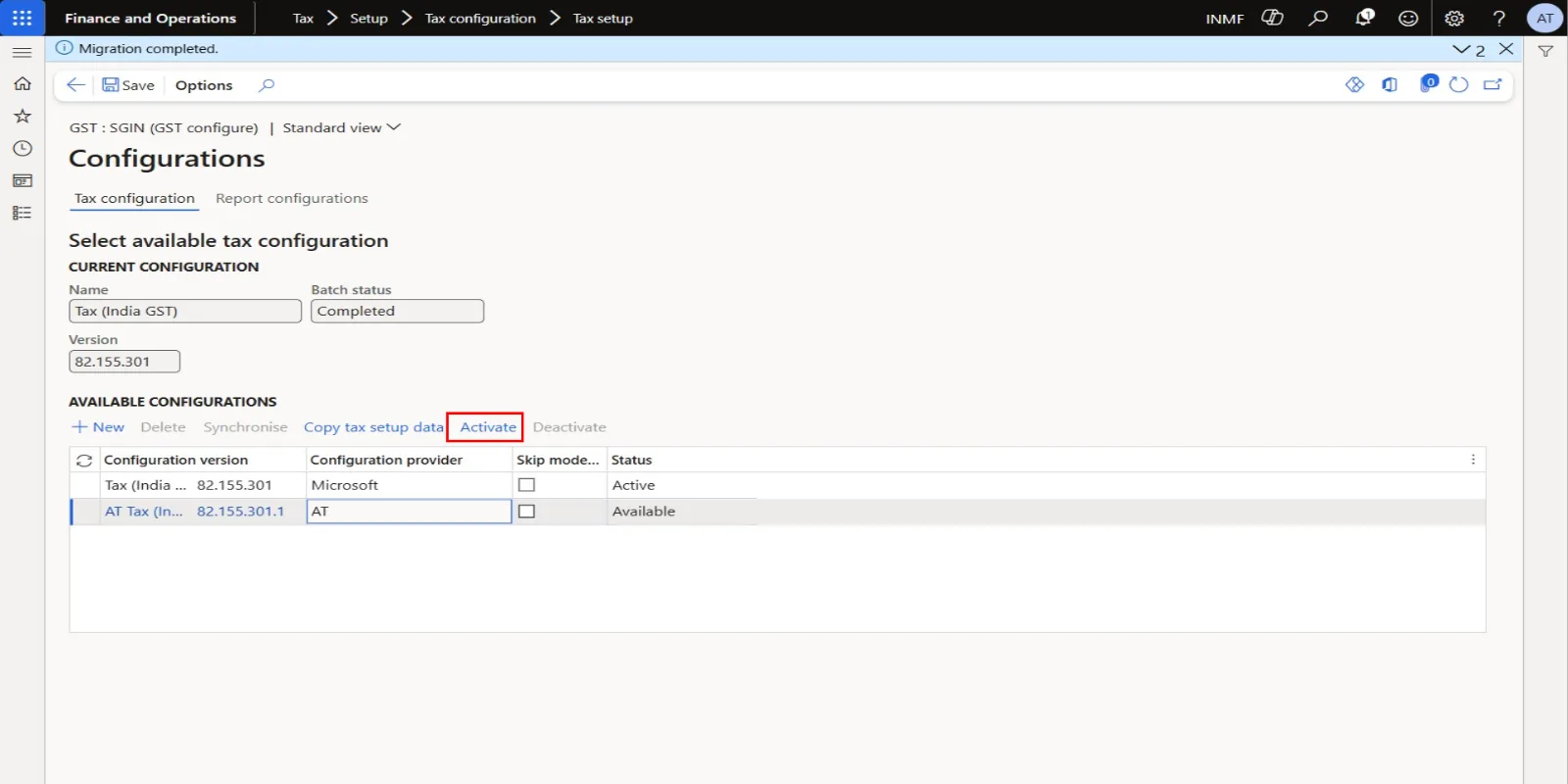
- Click Activate. The current configuration changes from Tax (India GST) 82.155.301 to AT Tax (India GST) 82.155.301.1.
Main account mapping
Go to Tax > Setup > Tax configuration > Tax setup, select the legal entity, select Setup, and select the GST node. On the Values FastTab, map a main account to the Interim Payable posting type for CGST, SGST and IGST for each GST registration number. The list of posting types is generated from the posting profile of the active configuration, and an account set at component level overrides the tax type level. Microsoft recommends setting accounts at component level per registration. Without this mapping, RCM invoice posting fails or the tax line has no ledger account.
Microsoft configuration updates
When Microsoft releases a new Tax (India GST) version, import it, rebase AT Tax (India GST) onto the new version, resolve any conflicts on the changed postings, complete the new version, and deploy it again through Tax setup (New, Synchronise, Activate). Retest the RCM posting scenarios after each rebase.
Rollback
To revert to standard behaviour, activate the Microsoft Tax (India GST) version again in Tax setup > Configurations. Transactions already posted keep their original vouchers.
Want to implement this RCM accounting requirement without manually modifying all six posting combinations?
You can download the ready-to-import Electronic Reporting (ER) configuration developed for this solution.
Configuration details:
Property | Details |
Configuration name | AT Tax (India GST) |
Version | 82.155.301.1 |
Configuration provider | AT – Aayush Dynamics |
File name | AT Tax (India GST) V 82.155.301.1 - RCM - Interim Payable.xml |
Purpose | Route the recoverable portion of RCM GST liability to Interim GST Payable |
How to use the configuration:
- Download the XML configuration file using the link above.
- Open D365 Finance & Operations and navigate to Electronic Reporting > Reporting configurations.
- Select Exchange > Load from XML file.
- Browse and select the downloaded XML file to import the configuration.
- Verify that the configuration is imported successfully and that its parent configuration and required dependencies are available.
- Complete the remaining deployment steps explained in this article, including Tax setup synchronisation, activation and Interim Payable main account mapping.
Important considerations:
- The file contains the derived configuration for the specific RCM accounting requirement discussed in this article.
- Ensure that the standard Microsoft Tax (India GST) configuration and required dependencies are available in your environment.
- Import and test the configuration in a sandbox/UAT environment before deploying it to production.
- Review the configuration version and compatibility with your D365 Finance environment before implementation.
- This extension changes the recoverable portion of RCM GST postings only. Non-recoverable RCM tax postings remain unchanged.
Disclaimer: This configuration is shared as a technical reference and implementation accelerator by AayushDynamics. It is not an official Microsoft-delivered configuration. Review and validate it against your organisation's GST accounting requirements before use.
The India GST tax engine in D365 Finance & Operations provides flexibility to accommodate business-specific accounting requirements through Electronic Reporting configuration extensions.
By deriving the standard Tax (India GST) configuration and modifying the credit posting type of the Interim Recoverable Amount tax measure, businesses can route the recoverable portion of RCM liability to Interim GST Payable instead of GST Payable.
The key advantage of this approach is that the original Microsoft configuration remains untouched, while the required accounting behaviour is achieved through a separate, maintainable ER configuration extension.